
ChatGPT vs Gemini vs Claude: their consumer plans offer controls over model training, but turning training off does not delete saved chats or prevent every kind of human access. Here’s how the settings I checked compare with the vendors’ documented policies, and what to check before sharing work data.
Right now, someone on your team is pasting a customer list into a free ChatGPT tab. Someone else is dropping an unreleased contract into Gemini to “just summarize it.” Nobody asked security. Nobody filed a ticket. It’s fast, it works, and the risk feels like someone else’s problem.
This is shadow AI, employees using personal, unapproved AI accounts for work data. The question to ask before pasting is: “Is this account approved for this document?”
So I checked. I opened the free web version of all three major assistants, went into the actual settings, and compared what happens to your data against each vendor’s official policy. Below is what I found, and the one thing you should do about it before Monday.
How I Compared This
This comparison mixes two kinds of evidence, and I label which is which so you can trust each line:
- ✅ Hands-on: I logged into the free web version of ChatGPT, Gemini, and Claude and confirmed the setting locations and defaults myself.
- 📄 Documented: Data retention periods, training conditions, and enterprise-tier policies come from each vendor’s official privacy policy and terms.
All findings reflect the web interface as of 2026. AI data policies change often, and all three vendors have revised theirs recently, so treat the settings paths as a starting point and confirm on your own screen.
ChatGPT vs Gemini vs Claude: The Free-Tier Privacy Table
| ChatGPT (Free) | Gemini (Free) | Claude (Free) | |
|---|---|---|---|
| When can ordinary chats be used for model improvement? | 📄 When model improvement is enabled; opt-out covers new conversations | 📄 With Keep Activity on; turning it off excludes future chats unless you submit feedback | 📄 When you allow it; safety review and feedback have separate rules |
| Can you opt out? | ✅ Yes (Settings › Data Controls) | ✅ Yes (Keep Activity) | ✅ Yes (Settings › Privacy) |
| Review and other uses beyond ordinary training | 📄 Authorized human access for abuse/security, support, legal matters, or model improvement unless opted out | 📄 Human review for improvement and safety; safety review can continue with Keep Activity off | 📄 Safety-flagged conversations may be analyzed and used for safeguards training; submitted feedback may also be used |
| Does turning training off delete saved chats? | 📄 No. Regular chats stay until you delete them | 📄 No. Existing activity needs separate deletion | 📄 No. Delete saved conversations separately |
| Retention after deletion or with activity off | 📄 Deleted chats: scheduled for removal within 30 days, with exceptions. Unsaved Temporary Chats: up to 30 days for safety | 📄 Keep Activity off or temporary chats: 72 hours with your account. Reviewed chats: up to 3 years, separately | 📄 Deleted chats: removed from back-end storage within 30 days, subject to legal and policy exceptions |
| Additional storage details | 📄 Turning training off governs new chats, not deletion of existing records | 📄 Saved activity follows your auto-delete setting; reviewed copies are separate | 📄 If enabled: new or resumed chats may be kept de-identified for up to 5 years in training pipelines |
Feedback is a separate choice: submitting it can make the associated conversation available for improvement even after training is turned off. Retention, model training, and human access are different questions; one switch does not settle all three.
In one line: check training use, saved-chat retention, and review access separately. Turning model improvement off is not a zero-retention setting.
ChatGPT Free: Opting Out Isn’t Deletion
On a personal ChatGPT account, OpenAI may use eligible content for model improvement when the setting is enabled. To turn it off, open Settings › Data Controls › “Improve the model for everyone” › Off.
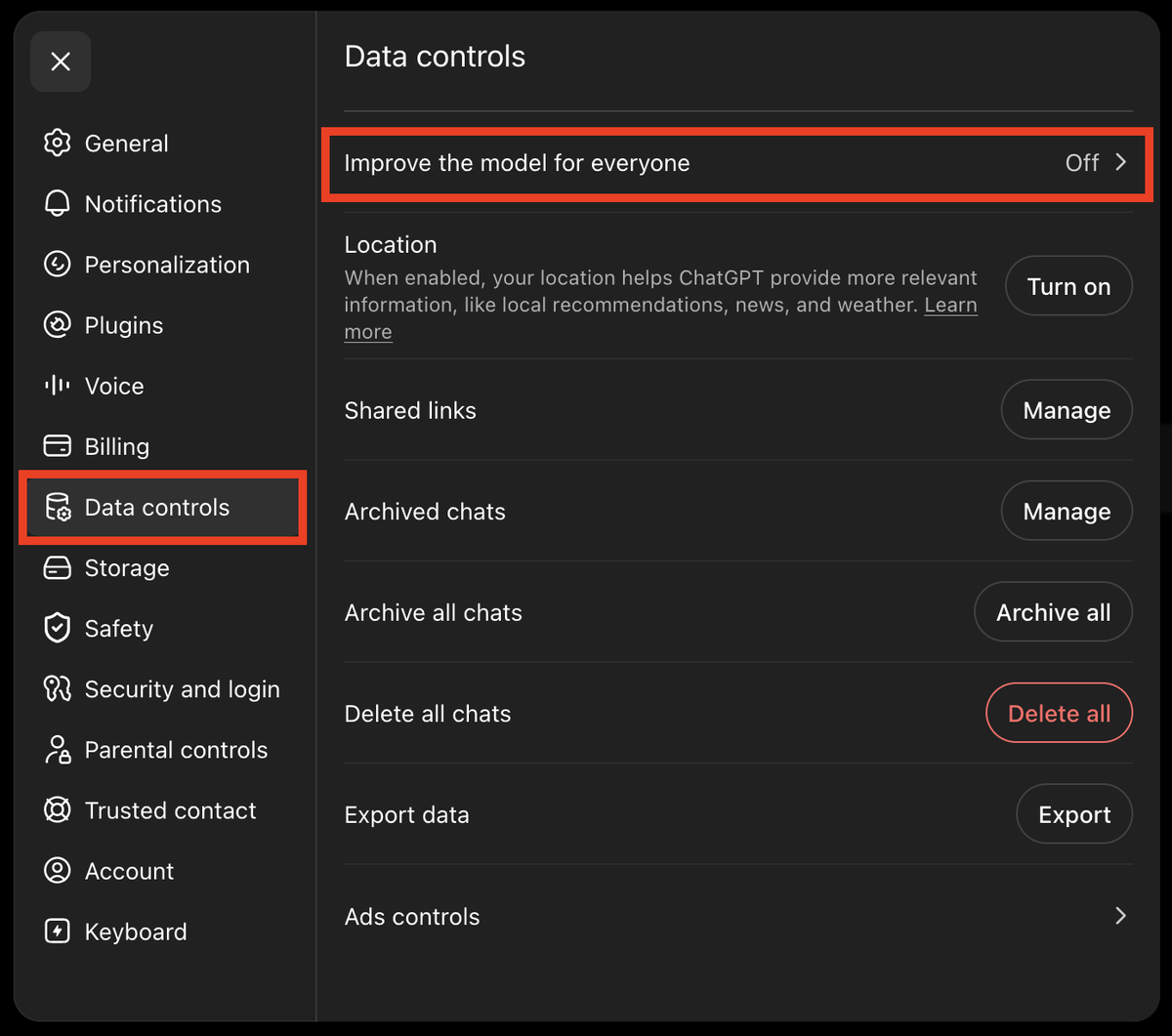
Turning it off is not deletion. Regular chats remain saved until you delete them. Deletion removes a chat from your account view immediately and schedules removal from OpenAI’s systems within 30 days, unless it was already de-identified and disassociated from your account or longer retention is required for security or legal obligations. Unsaved Temporary Chats follow a different rule: OpenAI may keep a copy for up to 30 days for safety. Saving one makes it a regular chat.
The training opt-out applies to new conversations. If you submit feedback, the associated conversation may still be used for training. Authorized people may also access content for support, security investigations, or legal matters; model-improvement access is another purpose when you have not opted out. The setting changes training use, not every form of access or storage.
Gemini Free: Human Review and Separate Retention
Google documents human review of a subset of Gemini chats for service improvement and safety. That is a reason to check what you share, not evidence that Gemini is uniquely accessible to people or the least private overall.
You opt out by turning off Keep Activity (in Gemini: Menu › Settings & help › Activity, or at myactivity.google.com/product/gemini), or by using Temporary Chat. Google renamed this setting from “Gemini Apps Activity” in September 2025, so older guides still use the old name.
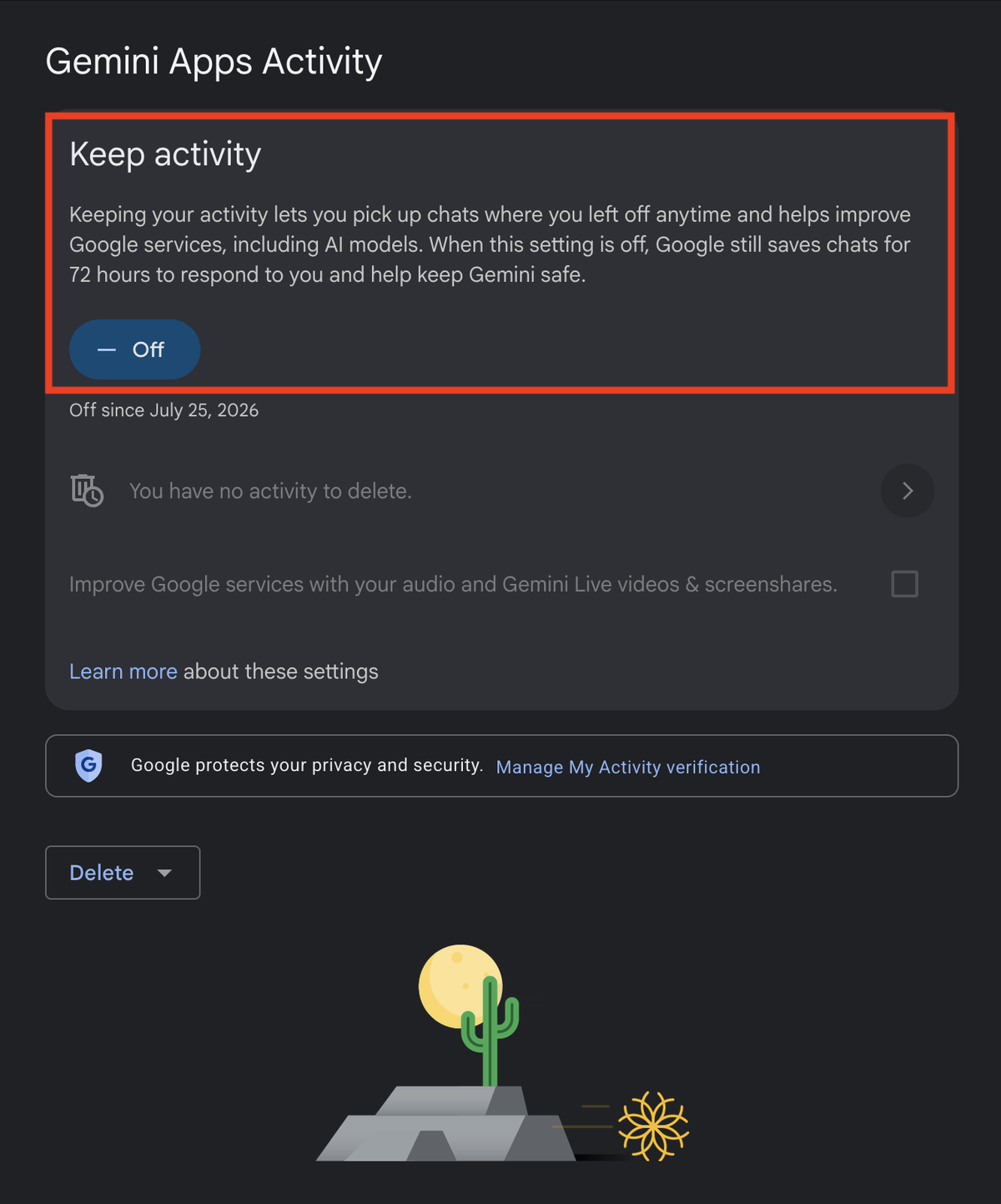
With Keep Activity off, chats are retained with your account for 72 hours. Future chats are not used to improve Google’s AI models unless you submit feedback, but human review for safety can continue. Reviewed chats are kept separately for up to three years and are not removed when you delete your activity. Turning the setting off does not erase those copies or existing saved activity.
(This section concerns consumer Gemini. For the API and AI Studio, check which terms apply: Unpaid Services can use inputs and outputs for product improvement and human review; Paid Services do not use prompts or responses for product improvement. Billing-linked access and regional exceptions can change that classification, so an interface being free is not enough to decide it.)
Claude Free: Training Consent and Deletion Are Separate
Claude’s consumer training policy is consent-based. That choice and the retention of a saved conversation are separate controls.
On August 28, 2025, Anthropic announced this choice. Anthropic did not quietly switch training on. It made every Free, Pro and Max user pick, with a deadline: “you have until October 8, 2025 to accept the updated Consumer Terms and make your decision,” and after that date you had to choose to keep using Claude.
If you enable training, new or resumed chats may be retained de-identified in training pipelines for up to 5 years. Turning it off does not delete saved chats. Anthropic’s current retention page puts the 30-day deletion window after you delete a conversation, subject to legal and policy exceptions. Change training consent in Settings › Privacy and delete conversations separately.
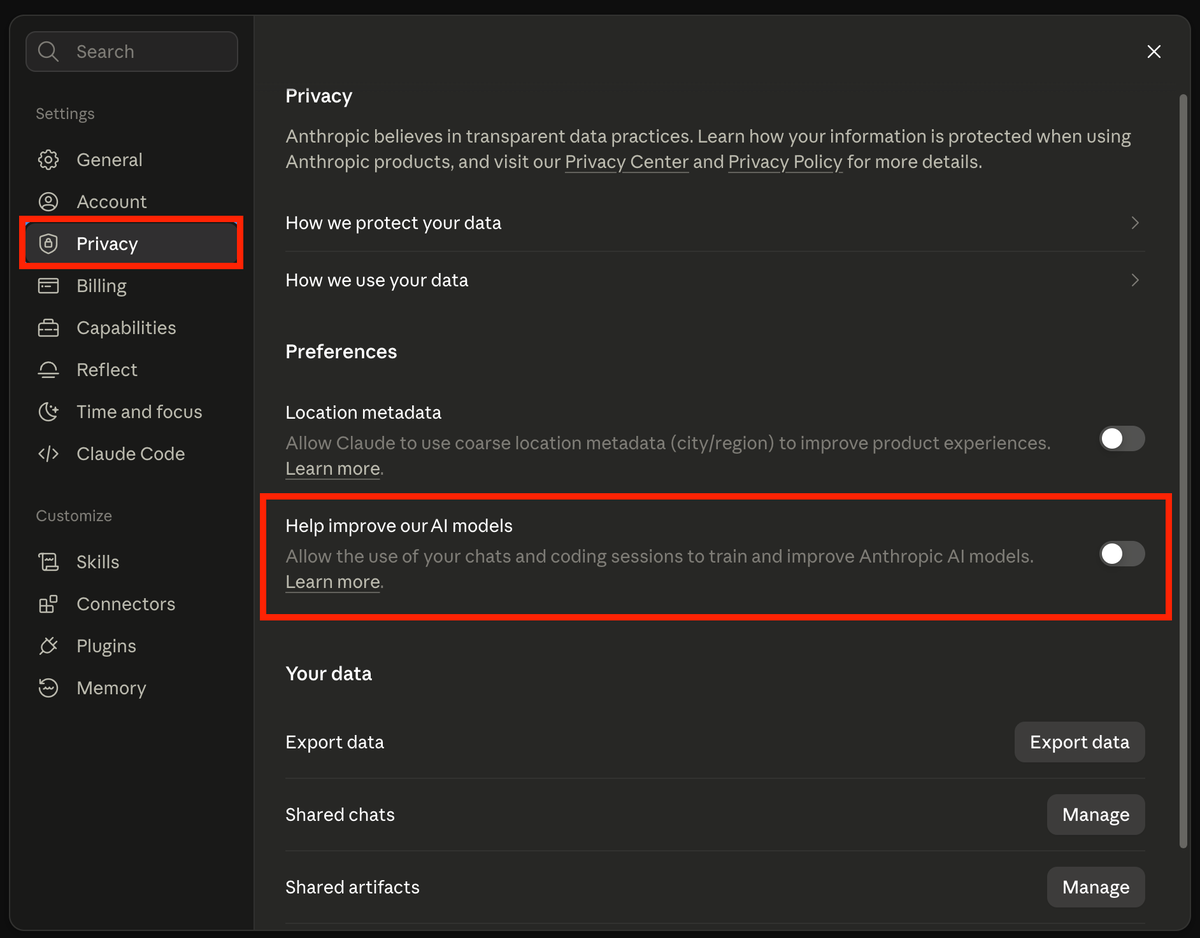
Safety-flagged conversations may still be used to improve policy enforcement, including safeguards models. Policy-violation inputs and outputs can be retained for up to two years, and classification scores for up to seven. Submitted feedback has separate use and retention rules. For ordinary model improvement, turning the setting off excludes previous and new chats from future training; it does not remove data from training already under way or models already trained.
Paid Personal Plans Still Need a Privacy Check
Paying for a personal subscription does not by itself give your company a data-processing agreement or permission to share a client’s confidential material. Check the contract for the specific product instead of treating a paid badge as approval.
A paid personal subscription does not, by itself, exclude your data from model training.
For a business account, verify three things before approving sensitive data:
- Training use: what the agreement excludes, and which optional sharing features change it.
- Retention and access: what is stored, who can reach it, and how deletion works.
- Contract coverage: whether the particular product and use are covered by the agreements your organization needs, such as a DPA or, where applicable, a healthcare BAA.
The takeaway: opting out on a consumer plan reduces one use of your data, but does not establish that sharing it is appropriate. Check the actual business agreement, retention settings, and permitted uses. “API” is not one policy: Google’s terms distinguish Paid and Unpaid Services, including billing and regional exceptions, and OpenAI’s Zero Data Retention requires eligibility. Read the specific terms rather than trusting the tier name.
Which Should You Use for Work Data?
Stop asking “which AI is safest.” The right question is “how sensitive is this data, and what class of plan am I on?” Match the two:
| Data type | Consumer plan (Free/Plus/Pro) | Team / Enterprise / API |
|---|---|---|
| Public or throwaway (brainstorms, public info) | ✅ Fine (opt out of training first) | ✅ Fine |
| Internal (drafts, internal docs) | ⚠️ Only with training off, and only if policy allows | ✅ Preferred |
| Confidential (customer data, unreleased code, financials, PII) | 🚫 Never | Only if approved for this data and purpose, with the necessary agreements and controls |
The table is my conservative recommendation for work use, not a statement that a business plan automatically permits every upload. Keep confidential data out of personal AI accounts and use only a setup approved for that data and purpose.
Your One Step This Week
Two actions, both under ten minutes.
1. Turn off model improvement on every personal account you use:
- ChatGPT: Settings › Data Controls › “Improve the model for everyone” › Off
- Gemini: Menu › Settings & help › Activity › Keep Activity › Off
- Claude: Settings › Privacy › turn off model training
These switches do not delete saved chats or eliminate safety processing. Feedback has separate rules, and Anthropic’s training opt-out also covers previous chats in future training runs. Delete stored conversations separately when you no longer need them.
2. Post a one-line AI data rule where your team will see it (Slack, Notion, wherever):
“Personal/free AI accounts (ChatGPT, Gemini, Claude) are fine for public or throwaway text only. Never paste customer data, unreleased code, financials, or anything confidential. Use our approved Team/Enterprise account for that.”
Make the approved account and the person responsible for exceptions easy to find.
FAQ
QWhich is more private: ChatGPT, Gemini, or Claude?
Which is more private: ChatGPT, Gemini, or Claude?
QDo ChatGPT, Gemini, and Claude train on your chats by default?
Do ChatGPT, Gemini, and Claude train on your chats by default?
QIs a paid plan like Plus or Pro safer than the free plan?
Is a paid plan like Plus or Pro safer than the free plan?
QHow do I stop these AI tools from training on my data?
How do I stop these AI tools from training on my data?
QCan I paste confidential work data into a free AI chatbot?
Can I paste confidential work data into a free AI chatbot?
Sources
- OpenAI: How your data is used to improve model performance
- OpenAI: ChatGPT privacy & data controls
- Google: Gemini Apps Privacy Hub
- Anthropic: Updates to Consumer Terms and Privacy Policy
- Anthropic: Is my data used for model training?
- OpenAI Help Center: Chat and file retention policies in ChatGPT
- OpenAI Help Center: Authorized human access to consumer content
- OpenAI Help Center: Training opt-out and feedback
- Anthropic: How long do you store my data?
- Google: Gemini API Additional Terms of Service, Paid and Unpaid Services
Policies and settings paths verified as of 2026. Confirm current defaults on your own screen before relying on them; these change frequently.