
This ChatGPT weekly planning system is how I structure my entire week in under 30 minutes as a solopreneur.
I’ve learned that if Monday starts reactively, the rest of the week usually follows. Most solopreneurs open ChatGPT on Monday with no clear input and no real direction. They stare at the blank prompt, cycle through a dozen tabs, and forty-five minutes later still haven’t decided what to work on.
The problem was never the tool. It’s the lack of structure before you open it.
In this post I’ll walk you through the exact input structure, the prompt, and the mindset shift that actually makes it work.
Why ChatGPT Weekly Planning Works for Solopreneurs
Before diving into the steps, it’s worth understanding why unstructured Monday mornings are so costly — and why AI planning solves the right problem.
- Decision fatigue: Solopreneurs make dozens of decisions daily, and research shows that making repeated choices can impair subsequent self-control. Without a plan, you burn your sharpest energy on the lowest-value question first — what should I work on?
- Context switching: Every unplanned task switch costs ~23 minutes of lost focus, according to research on task switching and interruptions. Intentional weekly blocks eliminate this.
- Blank-page paralysis: AI removes the two biggest planning friction points — blank-page anxiety and prioritization paralysis. You’re editing a plan, not building one from scratch.
Step-by-Step: How to Plan Your Week with ChatGPT in 30 Minutes
Here’s exactly how the system works:
Step 1: Prepare Your Weekly Inputs
I’ve been testing this ChatGPT weekly planning system for the past 5 weeks while running my solo blog, refining the prompt each week to make it more realistic. This is the most important step — and the one most people skip.
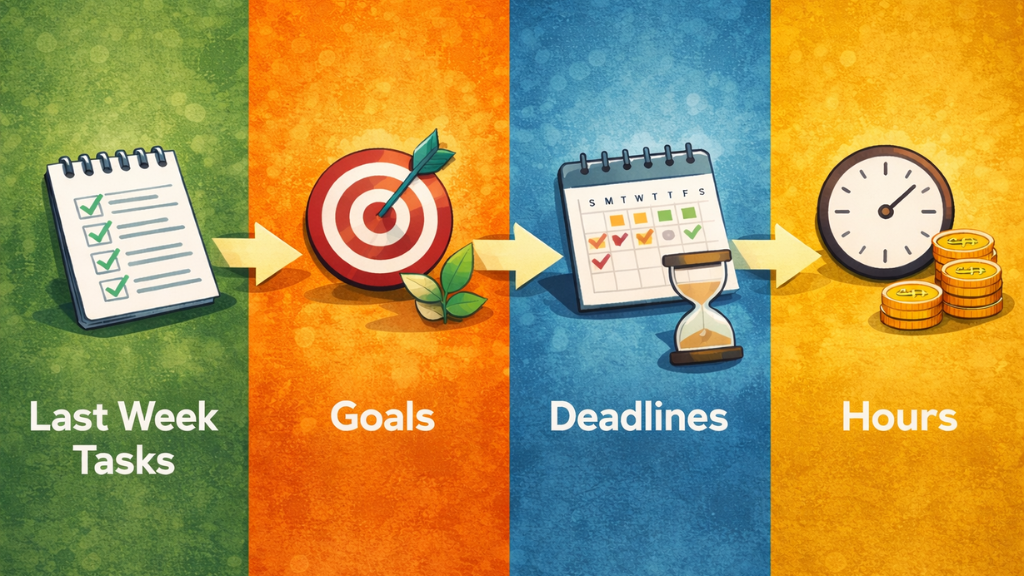
Before you open any AI tool, write down four things.
- Last Week Tasks
- This Week Goals
- Deadlines
- Available Hours
It takes five minutes and it’s what separates a useful AI plan from a generic one. If you provide real context — what you actually did, what you actually need, when things are actually due — you get a plan built for your week.
Step 2: Generate Your Weekly Plan with ChatGPT
Here’s where most people overcomplicate things. They spend 20 minutes crafting an elaborate prompt with role assignments, chain-of-thought instructions, and output format specifications. This is productive procrastination.
Create a realistic weekly plan based on the information below.
- Max 3 priority tasks per day
- Respect deadlines
- Include personal commitments
That’s the entire system. The quality of the plan comes from the quality of the input (from Step 1) — not from the sophistication of the prompt. Clear input beats clever prompting every time.
Step 3: Review and Adjust the AI-Generated Plan
ChatGPT just handed you a plan. Don’t follow it blindly.
AI optimizes for structure. You optimize for sustainability. Those aren’t the same thing.
- Treat it as a draft. Read it with your own judgment before committing.
- One core task per day. Three high-impact tasks on Monday isn’t a plan — it’s a wish list.
- Delete one task. AI fills every hour if you let it. You shouldn’t.
- Adjust for energy. Deep work in high-energy windows. Admin in the rest.
The first time I tried this, I let ChatGPT schedule five 4-hour deep work blocks in a single week. By Thursday I was exhausted and already behind. AI optimizes for logic, not for how a human actually runs out of steam. So now I manually remove at least one task per day before committing to anything. That one adjustment is what keeps the plan from falling apart by Wednesday.
Step 4: What AI Should Not Decide
AI is excellent at logistics. It is not equipped to make judgment calls that require context, relationships, or long-term strategic thinking. Hand those decisions to AI and you’ll end up with an efficiently organized plan heading in the wrong direction.
Specifically, do not let AI decide:
- What topic direction you should pursue long-term
- Your content positioning strategy and unique angle
- Pricing, monetization, or offer decisions
- How to handle a difficult client or collaborator situation
- Any decision where your instinct and values should lead
AI organizes. You decide.
Think of it as a highly efficient chief of staff who is exceptional at calendar logistics but has no stake in your business and no memory of what you’ve been building toward. Use it accordingly.
ChatGPT Prompt Template
Copy and paste the following into ChatGPT, Claude, or any AI assistant. Fill in the bracketed sections with your actual information. The whole process should take under 30 minutes from blank page to committed weekly plan.
The prompt I use is deliberately simple:
I am a solopreneur running an AI blog.
Based on the information below, create a weekly plan.

Rules:
- Output must be in table format only.
- No explanations.
- Max 3 priority tasks per day.
- Keep it realistic.
- Respect deadlines.
- Include personal goals.

Output format:
| Day | Deep Work (High Impact) | Light/Admin | Personal | Notes |
|-----|--------------------------|-------------|----------|-------|

Here is my input:

Last Week Tasks:
- Researched AI workflow keywords
- Wrote 1,000-word draft
- Added internal links
- Replied to emails
This Week Goals:
- Publish Blog Post #2 (1,500 words)
- Improve internal linking
- Exercise twice
- Attend musical (Sat 7PM)
Deadlines:
- Draft ready Wednesday
- Publish Friday 10AM
Available Hours: 20
Here’s what the generated weekly plan looked like:
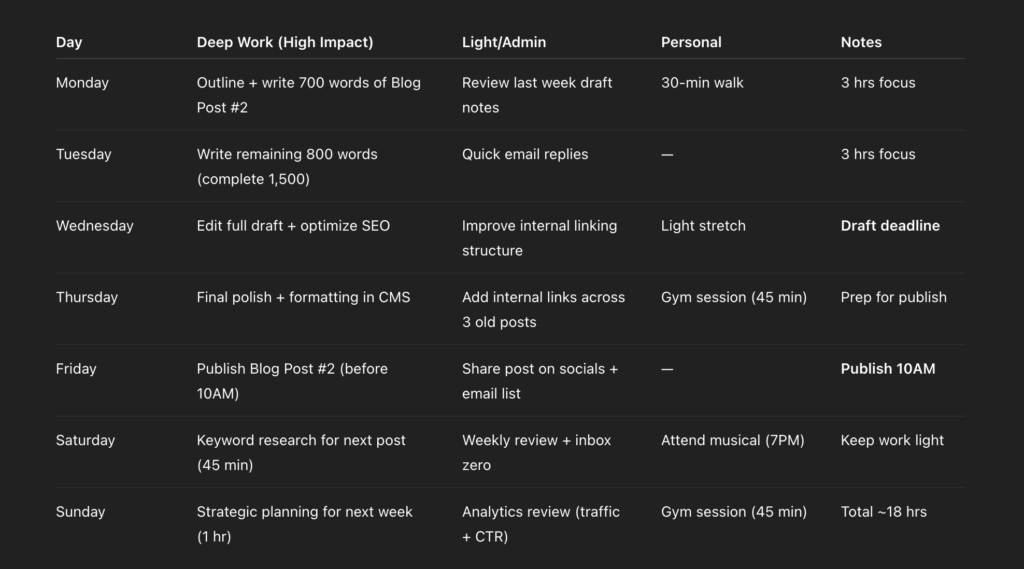
Notice how each day centers around one primary deep-work task. That structure is intentional. I then paste the table into Notion and use it as my working dashboard for the week.
Common ChatGPT Planning Mistakes
Mistake 1: Starting Without Clear Inputs
If your input is vague, your output will be vague. ‘Help me plan my week’ will generate a plan that looks reasonable but fits nobody in particular. The four-part input structure exists specifically to solve this. It takes five extra minutes and produces a plan that’s actually useful.
Mistake 2: Letting AI Over-Schedule You
AI will fill every available hour if you let it. It doesn’t know that you always underestimate editing time, that you have a slow Tuesday after a big Monday push, or that 6-hour focused work days are not sustainable five days in a row. After you get the AI output, manually trim one task per day before you commit to the plan. Build the buffer yourself — the AI won’t.
Mistake 3: Treating the AI Plan as Final
The AI plan is a draft, not a directive. Review it with your own judgment before committing. Ask yourself: does this sequence actually make sense given what I know? Is there anything the AI didn’t know to account for? The best use of an AI plan is as a strong starting point you refine, not a finished product you follow blindly.
Mistake 4: Obsessing Over the Perfect Prompt
Prompt engineering has its place, but weekly planning isn’t it. Twenty minutes spent crafting an elaborate prompt is twenty minutes not spent doing the actual work. The simple six-line prompt above has worked consistently across different week types, workloads, and goals. Start simple. Improve only if you hit a specific, repeatable problem.
FAQ: Planning Your Week with ChatGPT
Any major AI assistant works — ChatGPT, Claude, Gemini. The system depends on your input structure, not the specific tool. Start with whatever you already have access to.
If you’re not sure which AI tool fits your workflow, I compared ChatGPT, Claude, and Gemini here.
Yes — but adjust how you use it. For high-variability weeks, plan in 2-day chunks instead of full weeks. Give AI your best estimate and treat the plan as a flexible guide rather than a fixed schedule.
Once per week is enough for most solopreneurs. If your workload shifts often, add a 10-minute review mid-week to rebalance priorities.
Yes. Replace “last week tasks” with “last month outcomes,” and shift from task-level goals to project-level priorities. The structure stays the same.
AI assumes your time estimates are accurate. Most solopreneurs underestimate execution time. Reduce your available hours by 20–30% before prompting, or manually remove one task per day after generating the plan.
Should You Use AI for Weekly Planning?
Before this system, I used to spend 60–90 minutes every Monday just figuring out what to work on. Now that same process takes 25–30. And I actually end the week having done what I planned, instead of wondering where the time went.
Honestly, that alone was reason enough to keep using it.
If you want to give it a try, start small. Right now, before you close this tab, write down five things you actually did last week. Don’t organize them, don’t filter them, don’t think too hard about it. Just list them.
That list is your starting input. Structure comes next. AI comes last.