
If you’re wondering how to reduce editing time with ChatGPT, the solution isn’t better prompts. It’s a better workflow.
You open ChatGPT with a simple task in mind — maybe a client email, a proposal, or a piece of content for your business. You type something in, get a response, and think — almost. So you ask again. Make it better. Shorter. More professional.
Forty minutes later, you’re still in the same window. Still editing. Still not done.
If you’re a solopreneur using AI for real work, you probably know this loop. The tool isn’t the problem — the workflow is.
Most people try to fix it with better prompts or more prompt engineering. That’s not the problem. The Rewrite Loop isn’t a writing issue — it’s a workflow design failure.
In this post, I’ll show you how to redesign your ChatGPT workflow so rewriting becomes unnecessary from the start.
Why Most AI Work Turns Into Endless Editing
Here’s what most people’s AI workflow actually looks like.
You write a prompt, skim the output, spot something off, and start tweaking. Then you tweak the tweak. Forty minutes later, the task still isn’t done.
Ask → Read → Fix → Repeat
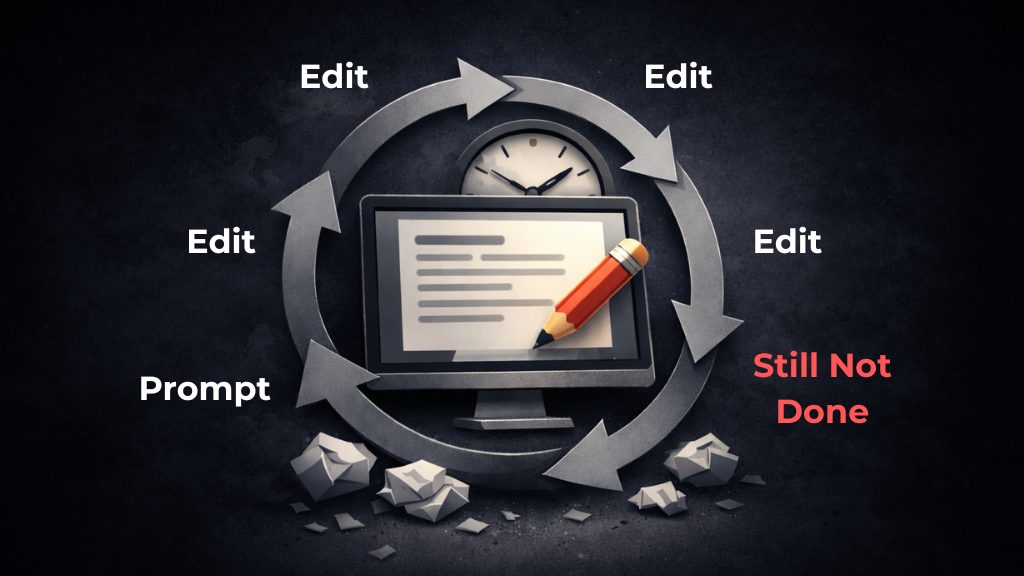
The problem isn’t your prompts. It’s that you’re working reactively — letting the output decide what happens next. Make it better. Shorter. More professional. Those aren’t instructions. They’re reactions.
No structure. No constraints. Just you chasing a moving target.
Output drives you instead of you designing the output.
And until that flips, no amount of better prompts will fix it.
From Reactive Editing to Designed Execution
If you want to reduce editing time when using ChatGPT, the solution isn’t better wording — it’s better structure.
Most people assume the fix is learning better prompt tricks — clever phrasing, longer instructions, more details. But that’s still reactive thinking. You’re trying to improve output without redesigning the workflow that produces it.
The real shift is moving from reacting to output to designing for outcome.
| Workflow | Pattern | |
|---|---|---|
| ❌ Reactive | Ask → Edit → Edit → Repeat | Output leads. You follow. |
| ✅ Designed | Define → Constrain → Generate → Upgrade Once → Lock | You lead. Output follows. |
A reactive workflow feels exhausting because you’re working hard — just in the wrong direction. A designed workflow feels lighter because every step has a purpose before you hit send.
One reacts. The other designs.
Here’s how to make that shift concrete in your daily work.
Core Framework: The No-Rewrite Work System
This system has four stages. Each one removes a specific reason why rewriting happens. Skip one, and the loop comes back.
Stage 1: Outcome Lock
Before you open AI, you need to know exactly what you’re building.
Vague input produces vague output. And vague output produces editing sessions that never end. The fix is simple: answer four questions before you type a single prompt.
- What is the exact deliverable? (e.g. a 150-word email intro, not just “an email”)
- Who is it for? (be specific — a cold lead, a returning client, a newsletter subscriber)
- What action should it drive? (click, reply, book a call, feel reassured)
- What’s the maximum length? (set a hard cap — it forces clarity)
Around two minutes. That’s all it takes to turn a vague creative task into a defined output spec.
Here’s a simple example. Let’s say you need a follow-up email after a discovery call:
Deliverable: 3-sentence follow-up email. Audience: potential client who asked about pricing. Goal: get them to book a next call. Max length: 80 words.
That’s it. You haven’t written a prompt yet — but you’ve already eliminated half the reasons you’d end up rewriting.
Stage 2: Constraint-Locked Request
Now you’re ready to write your prompt — but not the way most people do it.
Most prompts are just requests dressed up as instructions. “Write me a professional email about my new service offering.” That’s not a constraint. That’s a wish. And wishes produce generic output that you’ll spend the next fifteen minutes trying to fix.
A Constraint-Locked Request isn’t about being clever with language. It’s about giving the AI a structure it can’t escape from. Four elements, every time:
| Element | What it does |
|---|---|
| Context | Sets the situation and who you are |
| Objective | States the exact outcome you defined in Stage 1 |
| Constraints | Defines what the output must — and must not — include |
| Format | Specifies length, structure, tone |
Here’s what that looks like in practice:
Copy-Paste Templates (Use One, Edit the Brackets)
1) Client Follow-Up Email
Context:
I’m a [role] working with [type of client]. We had a [call/meeting] about [topic].

Objective:
Write a follow-up email in [X sentences] that [goal: e.g., gets them to book the next call].

Constraints:
- Acknowledge their key concern: [pricing/timeline/etc.]
- Add one line of value: [quick insight / next step / relevant resource]
- No fluff, no hype
- Max [XX] words

Format:
Tone: [confident / friendly / direct]
Structure: 1) Acknowledge 2) Value 3) CTA
Return ONLY the email text.
2) Proposal / Scope Summary (Work Document)
Context:
I’m writing a proposal for a [client type] in [industry]. The project is [duration] and the goal is [outcome].

Objective:
Write a [120–180 word] scope summary that makes the work feel clear and inevitable.

Constraints:
- Include: problem → approach → deliverables → timeline → next step
- Avoid buzzwords and vague claims (“world-class”, “cutting-edge”)
- Use concrete deliverables (bullets allowed)
- End with a simple CTA: [book a call / approve scope / reply with questions]

Format:
Tone: concise, businesslike
Structure: short paragraph + bullets + one-line CTA
3) Content (Blog Intro or LinkedIn Post)
Context:
My audience is solopreneurs using AI for real work (not AI engineers). They struggle with [problem].

Objective:
Write an intro that makes them feel “that’s me” and sets up the solution I’ll explain.

Constraints:
- Start with a specific situation (not a generic claim)
- Mention the cost (time, energy, missed decisions)
- No motivational fluff
- Max [120] words

Format:
Choose ONE:
A) Blog intro: hook → problem → promise
B) LinkedIn: hook line → short story → takeaway
Return ONLY the text.
Same task. Completely different output quality.
The structured version doesn’t require more creativity — it requires more clarity. And clarity is something you build before the prompt, not after.
Stage 3: One Structural Upgrade
You’ve set the outcome, built the prompt, and hit send. The output comes back — and this time, it’s actually close. Maybe 80% there.
This is the most dangerous moment in the workflow.
Because close is where the loop starts. One tweak becomes five, and suddenly you’re rewriting something that was almost done forty minutes ago.
So here are the rules:
- If it’s 80% correct, ship it. Don’t negotiate with 20%.
- No sentence-level edits until the structure is correct.
- One regen OR one revision. Never both.
Before you touch anything, ask yourself which of these actually applies:
- Is the structure wrong? (wrong order, missing a key part)
- Is the tone off? (too formal/casual, doesn’t match the context)
- Is a core message missing? (something that changes the whole point)
If none of those apply, you’re done. Ship it.
What’s not on that list: “I just feel like it could be better.” That’s perfectionism dressed up as editing — and it’s the engine that keeps the Rewrite Loop running.
One structural upgrade. Not five emotional tweaks.
The goal isn’t a perfect output. It’s a finished one.
Stage 4: Systemize (Automation Layer)
One great output is useful. A system that produces great outputs repeatedly — that’s leverage.
This is where most solopreneurs stop short. They get a prompt that works, use it once, and then reinvent the wheel the next time a similar task comes up. Same thinking, same drafting, same editing — just on a different day.
The rule here is straightforward:
- Used a prompt twice? → template it
- Edited an output three times? → your constraints need tightening
Start building a simple Prompt Library — organized by task type:
| Category | Example Templates |
|---|---|
| Emails | Follow-up, cold outreach, project update |
| Planning | Weekly priorities, project brief, meeting agenda |
| Content | Blog intro, LinkedIn post, newsletter section |
Each template isn’t just a saved prompt — it’s a saved decision. Instead of thinking through tone, structure, and length every time, you’re reusing decisions you’ve already made.
Once you start building that library, the same system extends beyond content — you can apply it to how you plan your week, run projects, or validate ideas with ChatGPT.
You don’t rebuild the framework. You just load, adjust for context, and generate.
“Automation isn’t about tools. It’s about reducing repeated thinking.”
That’s what this stage is really doing. Not automating the work but automating the setup for the work. So every time you sit down with AI, you’re starting from a system, not from scratch.
✅ Quick Recap: The No-Rewrite System

- Stage 1 – Outcome Lock: Define exactly what you need before you prompt
- Stage 2 – Constraint-Locked Request: Structure your input, not just your wording
- Stage 3 – One Structural Upgrade: One pass. Not five emotional tweaks.
- Stage 4 – Systemize: Turn what works into a repeatable template
Where This System Compounds Across Your Week
Here’s what makes this more than a productivity hack.
Most workflow improvements save you time on one task. This system saves you time on every task that involves AI — and for most solopreneurs, that list is longer than they realize.
Think about your average week. If you:
- Send emails — follow-ups, client updates, cold outreach
- Write proposals — intros, scope sections, pricing breakdowns
- Plan weekly — priorities, project briefs, team check-ins
- Draft content — blog posts, LinkedIn updates, newsletters
- Validate ideas — sanity-checking decisions, stress-testing strategies
Then every single one of those tasks runs through the same loop — or the same system.
The first time you apply the No-Rewrite System, you save 40 minutes. The second time, you’re faster because the constraints are already half-written. By the fifth time, you’re pulling from a Prompt Library and generating clean output in under ten minutes.
That’s not linear improvement. That’s compounding. A reactive workflow costs you the same time every single week. A designed workflow gets cheaper every time you use it.
And the real leverage isn’t just speed. It’s consistency. When your process is systemized, your output quality stops depending on how focused or energized you happen to be that day. The system carries the work — you just direct it.
One task. One system. Repeated across every output you produce.
That’s where it compounds. And the more AI becomes part of your workflow, the more this system pays for itself.
The 10-Minute Weekly System Reset
A system that doesn’t get maintained slowly turns back into chaos.
Most solopreneurs build something that works, then let it drift. Prompts get outdated. Templates pile up. Constraints that used to be tight start getting loose. Before long, you’re back to rewriting — not because the system failed, but because nobody tended to it.
This doesn’t have to be complicated. Ten minutes, once a week. That’s it.
Here’s the checklist:
- Review your top 3 tasks from the week — did any of them require more than one revision round? If yes, find out why.
- Strengthen your constraints — wherever the output felt off, tighten the spec. Add a length cap, clarify the tone, define the audience more precisely.
- Save what worked — any prompt that produced a clean output on the first pass goes straight into your Prompt Library.
- Delete what didn’t — outdated templates create noise. If you haven’t used it in three weeks and it doesn’t fit your current work, cut it.
💡 The 4-Step System at a Glance
- Define → What exactly do you need?
- Constrain → What must the output include — and avoid?
- Upgrade Once → One structural fix. Then ship.
- Lock → Save it. Systemize it. Don’t start from scratch again.
FAQ: Reducing Editing Time When Using ChatGPT
ChatGPT sounds generic when the objective and constraints are vague. If the audience, tone, or length aren’t defined, the model defaults to safe, broadly applicable language. Clear input produces specific output.
In most cases, one structural revision is enough. If you’re editing the same draft three or four times, the issue is usually in how the task was defined — not in the wording of the draft.
If the overall structure is wrong, regenerate with clearer constraints. If the structure is solid but one element is weak, make a single focused revision. Repeated micro-edits are what recreate the rewrite loop.
Better prompts help, but they don’t replace structure. Editing drops when the outcome, audience, and constraints are defined clearly before you generate anything.
Closing
Most people upgrade their tools. Few upgrade their workflow.
If you keep rewriting AI outputs, look at what happens before you hit generate. In most cases, the task wasn’t defined clearly enough, or the constraints were too loose.
Once the structure is in place, the need to rewrite drops dramatically. That’s what this system is meant to do — reduce friction, not add more technique.
Try it on your next task.
Before you open ChatGPT, write down the deliverable, the audience, the goal, and the constraints. Generate once. Make one deliberate revision if needed.
Then stop — and notice the difference.