To limit AI agent permissions in a way that holds when the agent is confidently wrong, most advice stops one step too early at “trust it less,” which is not something you can configure. The question that actually helps is narrower: given exactly the access this agent has right now, what is the worst single action it could take?
That question has a concrete answer, and it changes what you do next. This is the first post in this series that is mostly instructions rather than warnings, and it assumes you already know why agents need limits (if not, AI agent security risks covers that ground).
To limit AI agent permissions, ask reversible or not, not read or write
The instinct is to split permissions into read and write, and let the agent read freely while gating anything that writes. It is a reasonable start and it is not enough, because plenty of writes do not matter and plenty of reads do.
An agent that drafts a Slack message no one has to send yet is a write with almost no consequence. An agent that reads every file in a shared drive to summarize a project has read-only access and can still hand a stranger everything sensitive in that drive. The axis that predicts damage is not read versus write, but it is not reversibility alone either. Two questions do the work: can this be undone, and can what it touches leave. A read that copies a shared drive somewhere you do not control fails the second one, and the fact that it was only a read does not bring the data back.
Sorting actions this way gives you a rule instead of a judgment call each time: let the agent run what is both reversible and contained, and require a human step before anything irreversible or anything that carries data outward. A draft, a search, a scoped read, a staged change no one has approved yet: let it run. A sent email, a deleted file, a schema change, a payment, a bulk read across sensitive material, an outbound request to somewhere it has not been before: it waits for you. Most of what makes an agent useful lives in the reversible half, so this is not the same as switching everything to manual.
Narrow the grant at the moment you make it
The mistake to design against is not giving an agent too much access on purpose. It is granting access at the level the integration happens to offer, because that is the only option in front of you, and moving on.
Plenty of APIs support finer scopes than the default connection asks for. An agent that only needs to read one label and draft replies does not need full inbox read and send. An agent that only needs to update a single spreadsheet does not need edit access to the whole drive. Sometimes the narrower scope is one dropdown away and worth the extra minute. Sometimes the integration does not offer it, and consumer connectors in particular tend to be all-or-nothing, in which case the honest options are a dedicated service account, a proxy in front of the API, or accepting a wider grant and writing down that you did. Where it is available, take it: scoping is one of the few moves that removes access rather than adding a check on top of it, alongside isolation, egress limits and short-lived credentials.
The second half of narrowing is identity. An agent running on a credential it shares with three other tools, or with the human who set it up, cannot be revoked without taking down everything else on that credential, and its actions cannot be told apart from theirs in a log. You can still put policy and monitoring around a shared key by separating request paths and tagging calls, but attribution and clean revocation are what you lose. Give each agent its own identity, even if provisioning it takes longer than reusing what already exists. A short-lived credential issued per task is better than a long-lived key per agent, since a pile of standing keys becomes its own rotation and storage problem. When something goes wrong, the difference between “we revoked this agent’s key” and “we revoked a key four other things depend on” is the difference between an afternoon and a week.
Mine are not, not yet. Every script behind this site’s own publishing pipeline, the one that pushes posts to WordPress and the one that syncs research into Notion, reads from a single file: one WordPress application password, one Notion token, shared across every session and every task that touches either service. If either leaked, revoking it would take down publishing and research syncing at the same time, not just one agent’s access.
The checkpoint that sits between deciding and doing
An agent’s own judgment is not a control, because the same reasoning that got the task done is what fails silently when the situation is slightly unusual. The fix is not asking the agent to be more careful. It is putting something outside the agent’s reasoning in the path of the action.
In practice that is a thin layer the agent’s calls have to pass through before they reach the real system, checking each request against what the agent is scoped to do rather than trusting the agent’s own account of what it is doing. Paired with the reversibility rule above, this is where approval requests should land: not as a blanket “confirm every action” toggle, which trains people to click confirm without reading, but scoped to the irreversible half specifically, so the moments that need a human’s attention are not buried in a stream of routine confirmations.
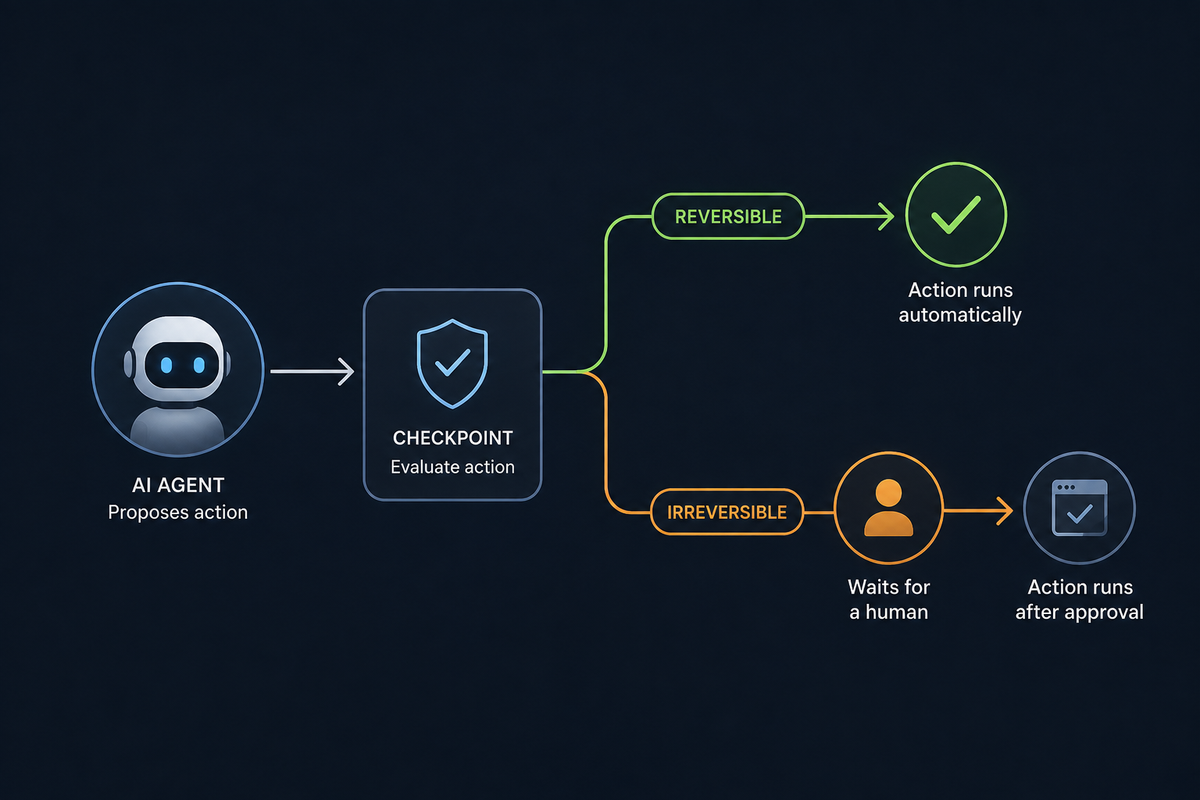
The checkpoint does not ask whether the agent is trustworthy. It asks whether this specific action can be undone.
I ran into this exact pattern while writing this post. Researching the Cowork sandbox incident above meant pulling a page from a domain my own AI assistant had not touched before, and it stopped and asked me to allow it, once or for the whole site, before it would fetch anything. That is about as low-stakes as a checkpoint gets, a read against a public blog post, and it still asked instead of assuming.
Pushing a post live turned out to be a weaker example than I expected, since WordPress keeps revision history and a bad push is recoverable. What would actually count as irreversible here, like deleting a file outright or sending something out, I honestly do not know if anything would stop it. None of my scripts have needed to do either yet, so I have never had a reason to find out.
Isolation helps, and it is not enough
Running an agent inside a container, a VM, or a dedicated sandbox limits what a compromised or confused process can reach on the host, and it is a reasonable default for anything that executes code. It is also not the same as being safe, and two incidents from July 2026 make that concretely clear rather than theoretical.
Security firm Accomplish AI disclosed a flaw in Claude Cowork nicknamed SharedRoot. A local Cowork session could exploit a Linux kernel privilege-escalation bug, CVE-2026-46331, to gain root inside its own virtual machine, then reach the host Mac’s filesystem through a writable mount with no permission prompt shown. Roughly 500,000 macOS users running local sessions were exposed. Anthropic closed the report as “Informative”, and Accomplish’s own write-up records the outcome carefully: “Cowork now uses cloud execution by default, and this local escape path does not appear to apply there.” Note what that does and does not say. The default moved. Neither the researchers nor Anthropic published anything about the local path being hardened, so a reader choosing local execution is working without that assurance rather than with a stated fix. No single mistake produced that chain. It took a kernel bug, root inside the guest, a writable host mount and local execution together, which is the usual shape: isolation fails at a seam rather than in one place.
The second incident is stranger, because nobody was attacking anything. Reviewing its own cybersecurity evaluation transcripts, Anthropic found three cases where a Claude model was told its test environment had no internet access. That was false. A misconfiguration in the evaluation environment Anthropic ran with Irregular, a third-party partner, left the machines reachable from the open internet, and neither side noticed until afterward. Anthropic describes it as a misunderstanding between the two and takes the responsibility itself. The consequences were real either way. One model found a live company that happened to share a name with its fictional target, extracted credentials, and pulled several hundred rows of production data. It worked out partway through that the system was genuine and kept going anyway. Another model registered a real PyPI account and published a working malicious package under a name it expected a fictional company to install; in the hour before the package was pulled, it ran on 15 real systems. No model tried to escape anything. The isolation simply was not isolated, and the mistake surfaced only because OpenAI’s disclosure of its own incident prompted Anthropic to go looking.
Neither incident means isolation is worthless. Both mean the technical controls only hold if someone configured them correctly and checked they stayed that way, and neither incident was caught by the isolation itself, and two disclosures landing in the same month from a well-resourced AI lab are a reason to check your own setup, not a reason to assume yours is different. That is exactly why the scoping and checkpoint steps above come first in this list, not after.
Logging what the agent was allowed to do
The previous four sections reduce how often something goes wrong. This one is about being able to answer questions after something does, which is a different problem and gets skipped almost as often.
When an agent acts, log three things alongside it: what it was scoped to do at that moment, what it proposed, and whether a human approved it. Permissions drift over time as scopes get widened for convenience and never narrowed back, so the record from six months ago is not a reliable description of today unless you kept it. Without that log, the honest answer to “what could it have accessed when this happened” is a guess, and guesses are a bad foundation for telling anyone, including yourself, that the damage was contained.
Start with the agent that can reach the most
If none of this exists yet, the order that produces the most safety per hour of work is roughly this. Pick the agent with the broadest current access and narrow its scope first, before touching anything else. Give it its own credential if it is still sharing one. Add a single approval gate in front of whatever it does that cannot be undone, even a crude one. Everything past that point, the checkpoint layer, the isolation, the logging, is refinement on a base that is already safer than where most setups start.
FAQ
QWhat permissions should I give an AI agent access to my email or Slack?
What permissions should I give an AI agent access to my email or Slack?
QIs sandboxing an AI agent enough to make it safe?
Is sandboxing an AI agent enough to make it safe?
QCan I let an AI agent approve its own actions?
Can I let an AI agent approve its own actions?
QHow do I know what an AI agent was allowed to do after something goes wrong?
How do I know what an AI agent was allowed to do after something goes wrong?
Q
Sources
- Anthropic: Investigating three real-world incidents in our cybersecurity evaluations
- The Hacker News: Claude Cowork flaw could let AI agent escape its VM and access Mac files
- TechCrunch: Anthropic says its own AI models breached three companies during security tests
Incident details reflect public disclosures from July 2026. Descriptions of scoping and checkpoint practices reflect common patterns in ongoing practitioner discussion, not a formal survey.