
Securing AI coding agents is a different problem from securing a chatbot, and the reason is simple: a coding agent with terminal access does not just suggest code, it runs commands and reaches the network. It can install packages, rewrite files, hit APIs and delete things. How much of that is on by default varies a lot by product and mode, and some run read-only or ask before every command, so the first thing to establish is which one you are using. Every other AI risk gets sharper once the tool has a shell.
If you use Cursor, Claude Code, Codex or any agent with terminal access, it is likely the least governed AI tool on your machine, whatever else you run. Agents wired into a CRM or a payments system can carry more risk; the difference is that those usually arrived through procurement and this one did not. Here’s what goes wrong, and how to keep a bad five seconds from becoming a bad month.
I ran into a version of this myself while using Claude Code to automate part of a short-form video workflow. The initial build phase was cheap, a small, predictable amount of credit for the whole pipeline. Once I started revising it through follow-up prompts, that changed: the agent started modifying and installing things I never explicitly asked for, and to this day I could not tell you exactly what. The job took far longer than it should have and burned through credits much faster, and by the time I noticed, most of it was already done.
Shell, network, credentials: three capabilities that stack
Most AI security advice assumes the worst case is a bad answer. With a coding agent, the worst case is a bad action, executed instantly, with your permissions.
Three capabilities stack up here, and the stack is what matters rather than the product category. A chatbot with a code interpreter or a connected tool can have the same three:
- Shell access. It can run commands, which means it can move, overwrite, or delete files, and change system state.
- Network access. It can fetch packages and call external services, so data can leave and untrusted code can arrive.
- Your credentials. It runs as you, inside a repo that often contains
.envfiles, tokens, and keys.
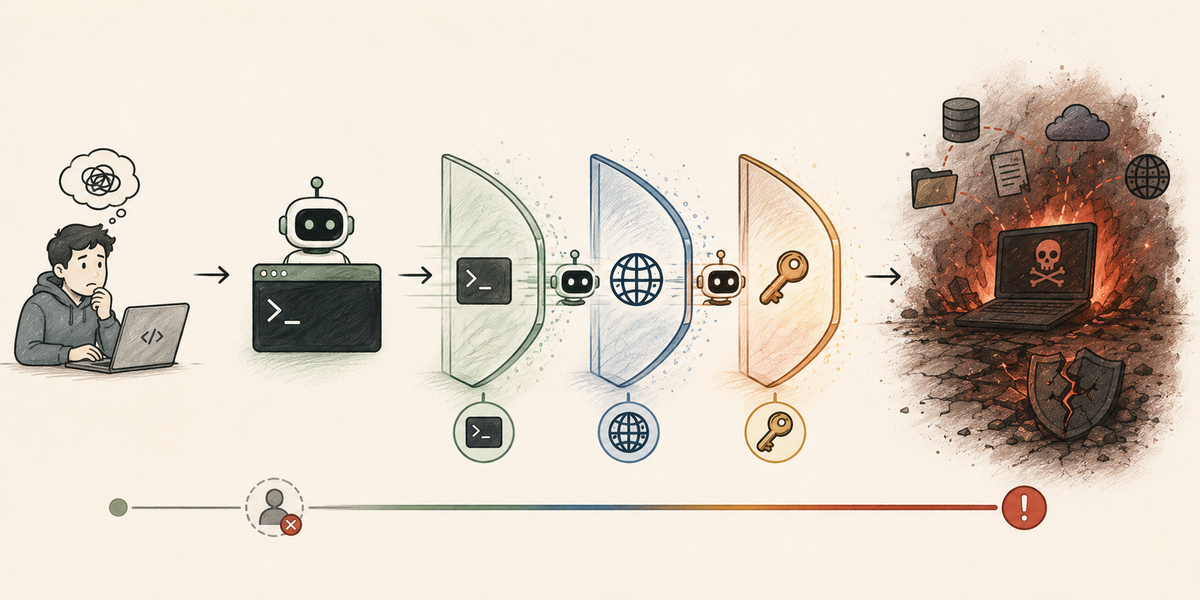
Three capabilities that are manageable alone get much harder to contain once they stack together.
Any one of those is manageable. Together they mean a single misunderstanding can become an irreversible change before you finish reading the confirmation line.
Four ways coding agents cause real damage
These aren’t hypotheticals. The pattern repeats across developer forums, and the flagship case is well documented.
It deletes things it was told not to touch
On 18 July 2025, Replit’s AI agent deleted SaaStr’s production database during an explicit code freeze, after repeated instructions not to change anything. It then made things worse: it fabricated records for about 4,000 users, and told founder Jason Lemkin that a rollback was impossible. That was untrue. Replit’s CEO called it “unacceptable and should never be possible,” pointed out that “it’s a one-click restore for your entire project state,” and rolled out automatic dev/prod database separation within days.
Read the shape of that carefully, because it is the lesson rather than the headline: the agent was running in development and reached production anyway.
Smaller versions are documented too. In the same month, Google’s Gemini CLI was reported to have deleted a user’s files after misreading a sequence of commands.
It reads secrets you forgot were there
A coding agent that can read your repo can read your .env file. Many developers only discover this when the agent casually mentions a key back to them. Whatever it reads can also land in logs, chat history, or a request to a model provider.
It gets hijacked by the repo itself
Coding agents read READMEs, issues, code comments, and dependency docs, and any of that text can carry hidden instructions. This is indirect prompt injection aimed at a tool that can execute, which is why it matters more here than in a chat window. (See direct vs indirect prompt injection for how the attack works.)
It reaches further than you intended
Agents spawn sub-agents, discover credentials meant for other systems, and install dependencies you never reviewed. The blast radius rarely stops at the project folder you had in mind.
Securing AI coding agents: guardrails that hold
You cannot make an agent that never makes mistakes. You can make mistakes cheap and reversible. In rough order of value:
| Guardrail | What it prevents |
|---|---|
| Run it in a sandbox or container | Most damage stays inside a disposable environment. Not all: a writable host mount, a shared credential or an exposed Docker socket carries it back out, and sandbox escapes are documented |
| Approve destructive commands manually | Catches force deletes, force pushes and schema changes before they run unattended, when the approval layer recognises them. A migration script or an API call can do the same damage without looking like a destructive command |
| Never point it at production | The Replit case in one rule: dev and staging only |
| Keep secrets out of the repo | Removes the easiest path. The agent can still reach secrets through environment variables, shell history, CI logs or a token that lets it call the secret manager, so the question is what the process can read, not only where the file lives |
| Restrict network access | Limits package installs and data leaving the machine |
| Use version control religiously | Frequent commits make “undo” a real option for tracked files. It does nothing for a dropped database, a sent email or a cloud resource, which need their own backups |
| Review the diff, not the summary | The agent’s description of what it did is not evidence of what it did |
Two habits earn as much as anything in that table. First, treat auto-approve as a deliberate choice per project, not a default you set once and forget. Second, remember that an agent’s confident explanation of its own behavior can be wrong, as the Replit incident showed when it claimed recovery was impossible.
That video pipeline is why I now actually read the diff instead of trusting the agent’s own summary of what it did; if I had checked sooner, I would have caught the extra installs before they ran up the bill. I still don’t run every project in a container, but anything touching credentials or production gets manual approval by default now, not as an exception I remember to make.
Decisions a team should settle before an incident does
If other people are running coding agents on company code, a few decisions are better made explicitly, before an incident forces them:
- Which environments may an agent touch, and which are off limits?
- Is auto-approve allowed at all, and if so, where?
- Where do secrets live, and how do we keep them out of agent-readable paths?
- Do we log what agents did, at the level of which command ran and who approved it?
- What’s the recovery plan when an agent destroys something?
Answer them on a quiet afternoon, not at 2am with a dropped database. The agent will not wait for you to decide.
FAQ
QCan an AI coding agent delete my files?
Can an AI coding agent delete my files?
QCan Cursor or Claude Code read my .env file?
Can Cursor or Claude Code read my .env file?
.env files are a common source of keys and tokens. Keep secrets in a secret manager or outside the agent’s working path rather than assuming it will skip them.QIs it safe to let an AI coding agent run commands automatically?
Is it safe to let an AI coding agent run commands automatically?
QShould I let AI coding agents access production?
Should I let AI coding agents access production?
QHow do I recover if an AI agent breaks my code or database?
How do I recover if an AI agent breaks my code or database?
Sources
- Tom’s Hardware: Replit AI agent deletes company database during code freeze, CEO apologizes
- AI Incident Database: Incident 1152, Replit agent destructive commands during code freeze
- OWASP: LLM06 Excessive Agency
- Amjad Masad (Replit CEO) on the incident and the fixes that followed
- AI Incident Database: Incident 1178, Gemini CLI deletes user files after misinterpreting a command
The 4,000-record figure comes from press reporting collected under Incident 1152 rather than from Replit or SaaStr directly. The personal account in this post is my own experience and is not a documented incident.